Tired of a slow, laggy computer?
Our One-Click Windows Optimizer is a powerful .bat tool that automatically:
✅ Cleans junk, temp, and cache files
✅ Updates Windows, drivers, and installed apps
✅ Defragments and tunes your storage
✅ Fixes registry and performance issues
✅ Checks for system errors and optimizes startup
With simple step-by-step options and auto-execution, it’s like having a built-in PC mechanic.
No software installation needed — just download, run, and watch your PC come back to life! 💻✨
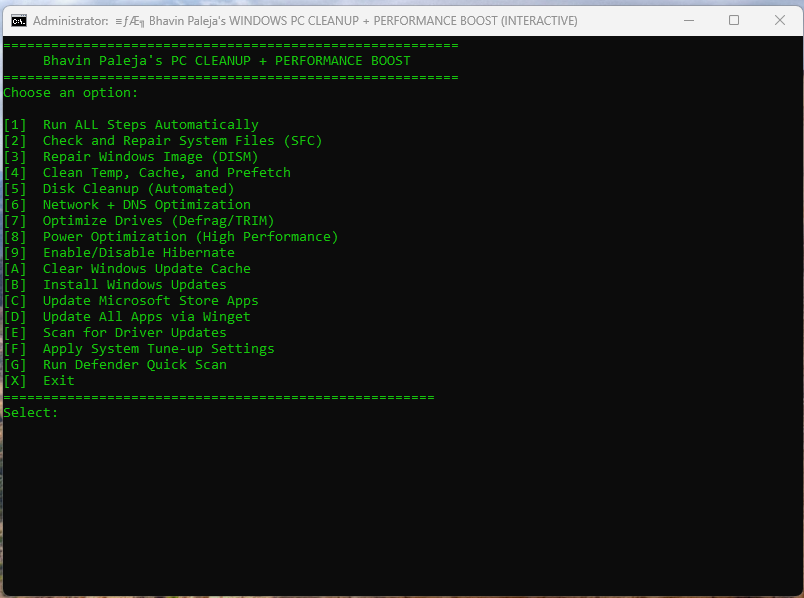
Tired of your computer running slow, freezing, or taking ages to start up?
Our One-Click Windows Optimizer is a free, safe, and lightweight automation tool designed to make your PC faster, cleaner, and smoother — without installing any software.
With just one click, it runs powerful commands that clean junk files, update drivers & apps, fix system errors, optimize startup, and boost overall performance.
🧠 Why Use This Tool?
Most Windows users don’t realize how much clutter builds up in the background — temporary files, cache data, unused updates, and outdated drivers.
Over time, these slow down even high-end PCs.
This .bat tool acts like your personal system mechanic, automating all the deep maintenance tasks that professionals charge for — safely, quickly, and efficiently.
🔧 Features & Functions
| Feature | Description |
|---|---|
| 🧹 Deep System Cleanup | Removes junk, temp, cache, and unnecessary log files that waste disk space and slow down your PC. |
| 🔄 Auto Windows Updates | Checks for and installs all pending Windows updates to keep your system secure and smooth. |
| 🧰 Driver Updater | Runs the Device Manager and Windows Update system to automatically update outdated hardware drivers. |
| 📦 App Updater | Scans and updates all installed Microsoft Store apps for the latest versions. |
| 🚀 Performance Tuning | Adjusts system settings, stops unnecessary startup apps, and tunes performance for speed and stability. |
| 💾 Disk Optimization | Runs Disk Cleanup, CHKDSK, and Defrag commands to optimize disk health and access time. |
| 🧩 Network Optimization | Flushes DNS, resets Winsock, and optimizes your internet performance. |
| ⚙️ Error Fixing & Maintenance | Scans for corrupted files using sfc and DISM tools and automatically repairs them. |
| 🔐 Privacy & Security | Clears browser history, temporary internet files, and ensures privacy protection. |
| 🧠 Smart Auto Mode | Choose to run all steps automatically or select individual maintenance tasks manually. |
🖥️ How It Works
- Download the Tool (.bat file) from our website.
- Right-click → Run as Administrator to give necessary permissions.
- You’ll see a step-based menu — choose “Run All” or individual steps like cleanup, updates, or driver optimization.
- Sit back and watch your system auto-optimize itself — within minutes!
- Once done, restart your PC to enjoy a noticeably faster, smoother performance.
💬 Why This is Better than Traditional Optimizers
Unlike bulky “optimization apps” that take up space or push paid upgrades, this is a pure Windows-native automation tool —
✅ No installation required
✅ No ads, bloatware, or third-party tools
✅ 100% transparent (you can read the code!)
✅ Lightweight and portable — fits in 1 MB
✅ Works on Windows 10 and Windows 11 (32-bit & 64-bit)
🔒 Safety & Transparency
This tool uses official Microsoft CMD and PowerShell commands — no hidden scripts or external software.
Every operation (cleanup, update, tune-up) uses Windows-native utilities like cleanmgr, DISM, sfc, and wuauclt.
You can open and read the .bat file in Notepad before running it.
🌍 Compatibility
✔ Windows 10
✔ Windows 11
✔ Laptops, Desktops, All-in-One PCs
✔ Works on both Home and Pro editions
📦 Download & Try Now
Click the button below to download your free One-Click Windows Optimizer.
Start your PC’s transformation today — it deserves to run at full speed! ⚡
[⬇️ Download Now — Free Windows Optimizer]
File Size: ~1 MB | Format: .bat | Version: 2.0
🏁 Pro Tip
💡 For best results, run this tool once every 2 weeks to keep your PC at peak performance.
Combine it with a good antivirus and disk cleanup routine for a smooth, long-lasting system.